


Transparent clock and weather
4.236.10K Reviews
App Specs
- Version
- 9.17.0
- Updated On
- License
- Free
- Downloads
- 50,000,000+
- Developer
- MACHAPP Software Ltd
- Categories
- Weather
- Platform
- Android, iOS
Screenshots
 Analysis by AppCompare
I find a weather app most useful when it answers two questions quickly: what is happening now, and should I change my plans? Transparent Clock and Weather makes those checks convenient by pairing weather details with a clock and a home-screen widget. Its transparent styling is more than decoration: it can keep the information visible without making the home screen feel like it has been covered by a solid panel.
When the forecast depends on a connection
Weather information is only useful when it is current enough for the decision at hand. This app is built around looking up conditions and forecasts, so I treat a fresh view as something to check when I have a working connection rather than assuming every detail will always refresh. That matters most when rain or changing temperatures could affect a commute, a walk, or an outdoor appointment.
The practical habit I recommend is to open the app before leaving, not only glance at the widget while already heading out. A widget is ideal for a fast temperature check; the fuller view is where I would look when timing matters. If the information seems stale during a connectivity problem, I would avoid treating it as a live local reading and check again once the phone can reach the service.
Guides and Analysis on Transparent clock and weather
A useful fit for home-screen weather checks
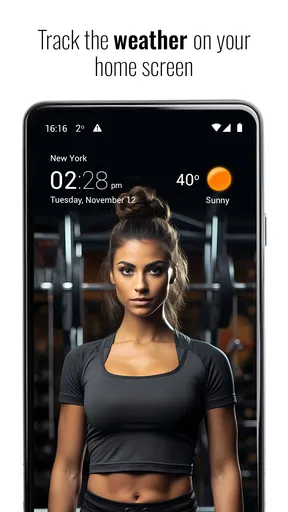
The strongest reason to choose this app is the combination of weather and clock in a customizable widget. I can see why it suits someone who checks the time and temperature repeatedly throughout the day and wants both in one glance. The adjustable size and transparency also help when a standard opaque widget clashes with a carefully arranged home screen.
It is less compelling for someone who wants the plainest possible forecast screen and has no interest in widget styling. A built-in weather app may be enough if all you need is a quick local outlook and you do not want another app to configure. I would also look elsewhere if your priority is specialist storm analysis rather than an everyday blend of forecasts, clock, and presentation.
One ordinary day, and a better way to use it
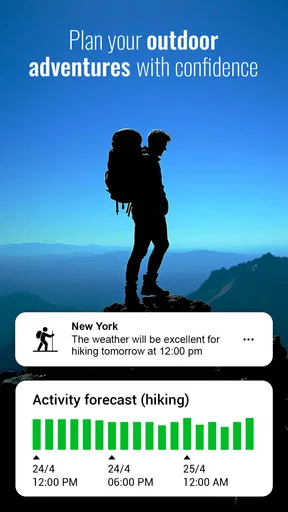
Imagine checking the phone before a morning commute, then taking another look before an after-work walk. The first glance can tell me whether the day looks comfortable; the later check helps me decide whether to bring a layer or change the walk’s timing. Hourly information is more helpful for that second decision than a single daily summary, while sunrise and sunset times are handy when I am trying to fit an outdoor activity into daylight.
My small but useful tip is to choose a widget size that shows the details I actually consult, then leave enough room for the rest of the home screen. Making the widget too large can turn convenience into clutter. I would also test the transparency against both a light and a dark wallpaper: a setting that looks elegant on one background may make the text harder to pick out on another.
Worth Reading Before You Choose

QuizzLand Review: A Good Fit for Short Trivia Breaks, Not Every Player

Basketball Stars: Multiplayer Is Fast, but Can It Recover When Matches Go Wrong?

WEBTOON Turns Phone Updates Into a Better Reading Routine

Link to Windows Runs on Shared Habits, Not Social Feeds

How Alibaba.com Dominates the B2B Marketplace

Metro's Quiet Rise: Redefining Mobile Communication
For an outing that depends on precise timing, I would check the forecast shortly before leaving and again if plans shift. A forecast is guidance, not a guarantee, and a broad daily view cannot answer every question about a particular street or exposed route. That is a useful distinction: this app helps with everyday planning, but I would not make it my only source for a high-stakes weather decision.
How it compares with simpler alternatives
Many weather apps emphasize a forecast screen first, while this one gives the home-screen widget a central role. That difference is valuable if you prefer to check conditions without opening a full app each time. Compared with a basic clock widget, it adds weather context; compared with a minimalist forecast app, it gives more room to tailor the look and combine information.
The trade-off is that customization takes attention. People who enjoy adjusting skins, size, and transparency may see that as part of the appeal; those who want an app to be ready with no visual decisions may find it unnecessary. I would choose the simpler alternative if the only requirement is a quick temperature reading, and this one if the clock-and-weather combination is something I expect to see on my home screen all day.
What to expect when something goes wrong
If a forecast does not appear to match the conditions outside, I would first check whether the app has had a chance to refresh and whether the selected location is the one I mean to follow. Those two checks are more useful than repeatedly changing widget styles. If connectivity is interrupted, a home-screen display may not be the best place to judge whether information has updated; opening the app after service returns is a more sensible recovery step.
Location access makes local weather more convenient, while choosing or checking a location manually can be preferable when I want to follow somewhere else, such as a destination before travelling. I would make that choice deliberately rather than granting access without considering how I use the app. The key is to match the location shown to the decision I am making: home for the morning commute, destination for planning a day out.
Use it thoughtfully on mobile data
For someone keeping an eye on mobile data, I would reserve detailed checks for moments when they help with a decision and rely on the widget for quick glances between them. I would not repeatedly open the app just to watch conditions that are unlikely to affect my plans. The same approach keeps weather checking useful rather than turning it into a habit of refreshing without purpose.
Connectivity also shapes how I interpret updates. A forecast can be useful without needing constant attention, but the closer I get to a weather-sensitive plan, the more sense it makes to look again. If I am heading out for a casual errand, a brief check is enough; for a long outdoor commitment, I would check nearer the time and keep a backup source in mind.
There is a sensible balance between convenience and certainty here. The widget reduces the friction of checking, but it does not remove the need to think about when the information was last refreshed or how local conditions can vary. That is not a reason to avoid the app; it is simply the right way to use any phone-based forecast.
First Impressions and Setup
When I first opened up Transparent Clock and Weather, I was greeted by a clean and intuitive interface. You know that feeling when an app just "clicks"? Yeah, it was like that. The setup process was pretty straightforward—no jumping through hoops. I simply allowed location access, and the app did its magic, presenting me with the current weather and time in a sleek, transparent widget. It’s a breeze to get started, which is a big plus for those of us who aren’t exactly tech-savvy.
Customization Galore
If you're anything like me, you love to personalize your apps. And boy, does this app deliver on that front. You can tweak the widget’s size, choose from a variety of skins, and even adjust the transparency level. It's like having a mini design studio on your phone. I spent a good chunk of time playing around with these settings, trying to find the perfect balance between visibility and aesthetics. The flexibility here is truly impressive.
Features That Stand Out
What sets this app apart from the sea of weather apps? Let me tell you about some of the features that caught my eye:
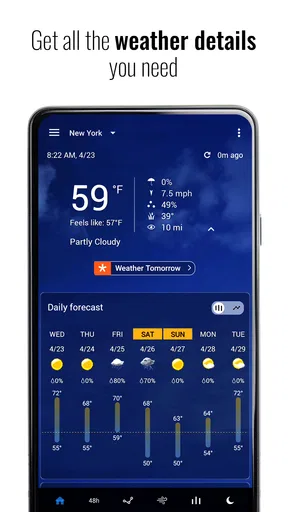
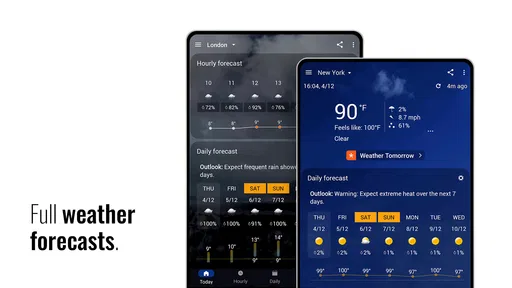
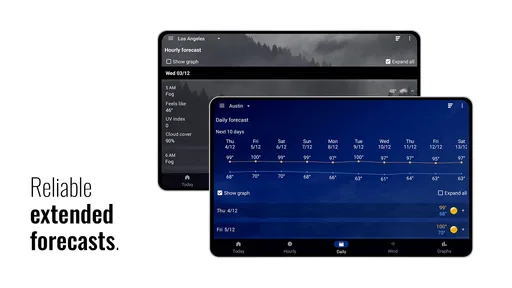
- Detailed Weather Info: Not just today’s weather, but a 7-day forecast that gives you a heads-up on what to expect. Perfect for planning that weekend getaway.
- Hourly Updates: If you're as obsessed with weather changes as I am, you'll appreciate the hourly updates. No more surprises when you step out!
- Sunrise and Sunset Times: For those romantic evening plans or early morning runs, knowing when the sun rises and sets is super handy.
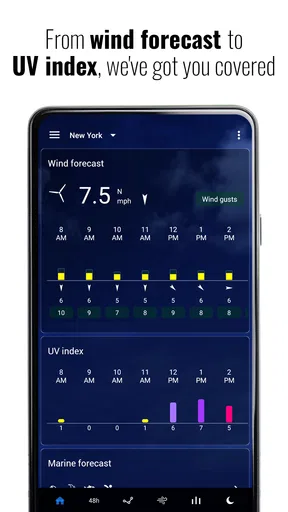
- UV Index and Humidity Levels: Important for those of us who like to keep an eye on these details for health and comfort reasons.
Performance and Usability
Performance-wise, Transparent Clock and Weather is a champ. It runs smoothly without any noticeable lags, even when I was flipping through various skins and settings. The app is lightweight, so it doesn’t hog your phone’s resources, which is always a bonus. Usability is top-notch, with everything being just a tap away—perfect for when you need info on the go.
Why You Might Love It
There’s a lot to love here. If you value customization and a clean interface, this app has you covered. Plus, the attention to detail in the weather data is impressive. It’s like having a personal weather station in your pocket. I also appreciate the widget’s ability to blend with any wallpaper thanks to its adjustable transparency. It just looks so good on my home screen!
Another thing worth mentioning is how often the app updates its information. You can rest assured that the data you're seeing is fresh and reliable. It’s a crucial aspect for any weather app, and Transparent Clock and Weather nails it.
There are a few practical details worth weighing before installing. MACHAPP Software Ltd makes this free weather app, which has an average rating of 4.2 from around 986 thousand ratings and over 50 million installs. It is rated Everyone, and the current version is 9.01.2 for devices running Android 6.0 or later. Optional in-app purchases range from $4.99 to $15.99 per item, so I would start with the free experience and decide whether any paid extras matter to my routine.
The app has been around since August 23, 2012, and its long history is useful context, but it does not mean every person needs its extra flexibility. I see it as a practical choice for people who want forecast details close at hand and enjoy tuning the look of a widget. Someone who dislikes home-screen widgets, rarely checks forecasts, or wants only a no-frills time display can skip it without missing an essential phone function.
Final Thoughts
So, is Transparent Clock and Weather worth downloading? I’d say absolutely! It strikes a great balance between functionality and aesthetic appeal, offering a range of features that cater to both casual users and weather enthusiasts. Plus, it’s free, with some optional in-app purchases if you want to unlock even more features.
In a world filled with weather apps, this one stands out with its transparent design and detailed features. Give it a try, and you might just find yourself checking the weather more often—just because you can.
My connectivity verdict
I recommend it most to people who want a glanceable, customizable clock-and-weather setup and are comfortable checking forecasts when a connection is available. Its widget can make routine decisions quicker, while the hourly outlook and daylight details give me reasons to open the app when a plan depends on timing. I would choose a more focused weather tool for specialist storm work, and a simpler built-in option for occasional temperature checks.
The main trade-off is straightforward: presentation and at-a-glance access are strengths, but they do not make forecasts infallible or remove the need to check that the displayed location and information suit the moment. Used that way, it is an appealing everyday companion rather than a substitute for judgement. If that matches how you use your phone, I think it is worth trying.
Pros
- Intuitive
- user-friendly interface.
- Highly customizable widgets.
- Accurate weather updates.
- Supports multiple locations.
- Battery-efficient performance.
Cons
- Ads can be intrusive.
- Occasional syncing issues.
- Limited free features.
- Widgets can lag on older devices.
- No offline mode available.
FAQs for Transparent clock and weather
What features does the Transparent Clock and Weather app offer?
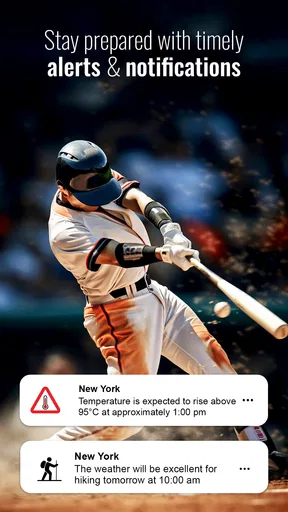
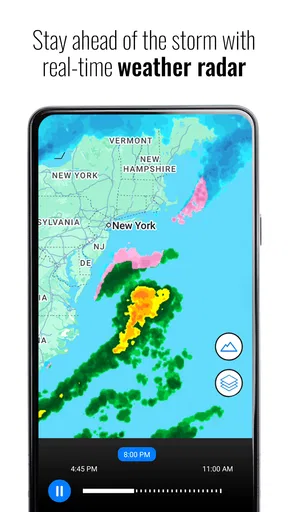
The Transparent Clock and Weather app provides a comprehensive suite of features including detailed weather forecasts, temperature updates, humidity levels, and wind speed. Users can customize the appearance with various themes and widgets, and it supports both Celsius and Fahrenheit. Additionally, it offers real-time alerts and radar maps for enhanced weather tracking.
Is the Transparent Clock and Weather app free to use?
Yes, the app is free to download and use, offering a range of features without charge. However, there are in-app purchases available for users who wish to access premium features, such as additional customization options, an ad-free experience, and enhanced weather data.
How accurate are the weather forecasts provided by the app?
The app sources its weather data from reliable meteorological agencies, ensuring a high level of accuracy in its forecasts. It provides hourly, daily, and weekly weather predictions, and its real-time updates help users stay informed about sudden changes in weather conditions. However, like all weather apps, occasional discrepancies can occur.
Can I customize the appearance of the widgets in the Transparent Clock and Weather app?
Absolutely. The app offers a variety of customization options for its widgets, allowing users to change themes, colors, and transparency levels. This helps users tailor the app’s appearance to their personal preferences or device’s home screen aesthetic, enhancing usability and visual appeal.
Does the Transparent Clock and Weather app consume a lot of battery or data?
The app is designed to be efficient, ensuring minimal battery and data usage. While it updates weather information automatically, users can adjust the update frequency settings to conserve battery life and data. Additionally, the app runs seamlessly in the background without significant impact on device performance.


